Connection Layer: MCP Protocol, Multi-Client Access & API Interoperability Standards
In-depth perspective on acp_adapter/ protocol bridging, LSP/JSON-RPC instruction flow & tools/registry.py dynamic injection
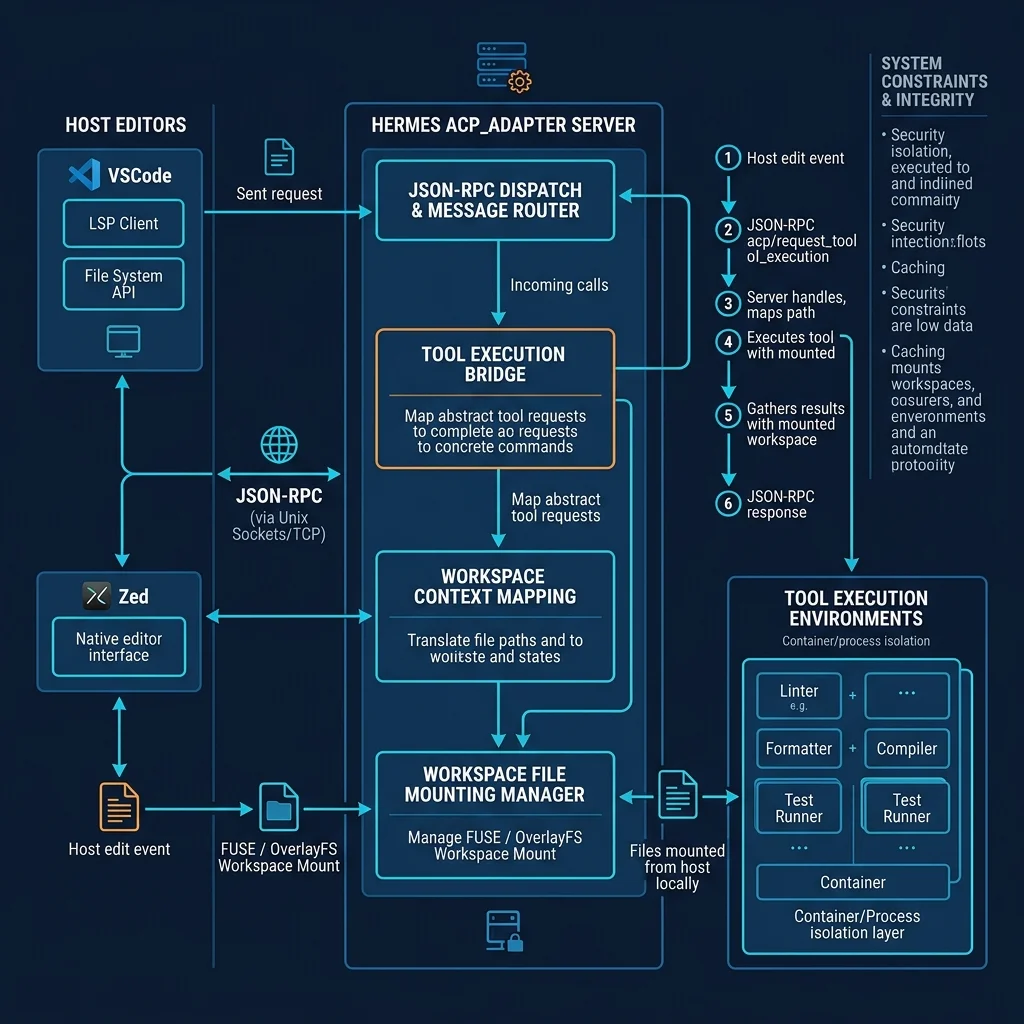
📊 Fig 10-1: Host editor client, ACP bridge adapter & execution sandbox integration diagram
🔌 1. Model Context Protocol (MCP) & Narrow Waist
Model Context Protocol (MCP) is the industry-standard protocol for decoupling AI agents from external tools and context. In the Hermes architecture, MCP plays a critical isolation role:
- Protocol Isolation: The core LLM does not directly know the underlying environment's APIs. Instead, it communicates via the MCP client using standard JSON-RPC for negotiation and discovery.
- Service-Gated Tools: Tools do not need to be permanently stacked in the LLM's System Prompt. Instead, they are dynamically registered based on the current configuration (e.g., when a Home Assistant token exists), saving significant caching costs.
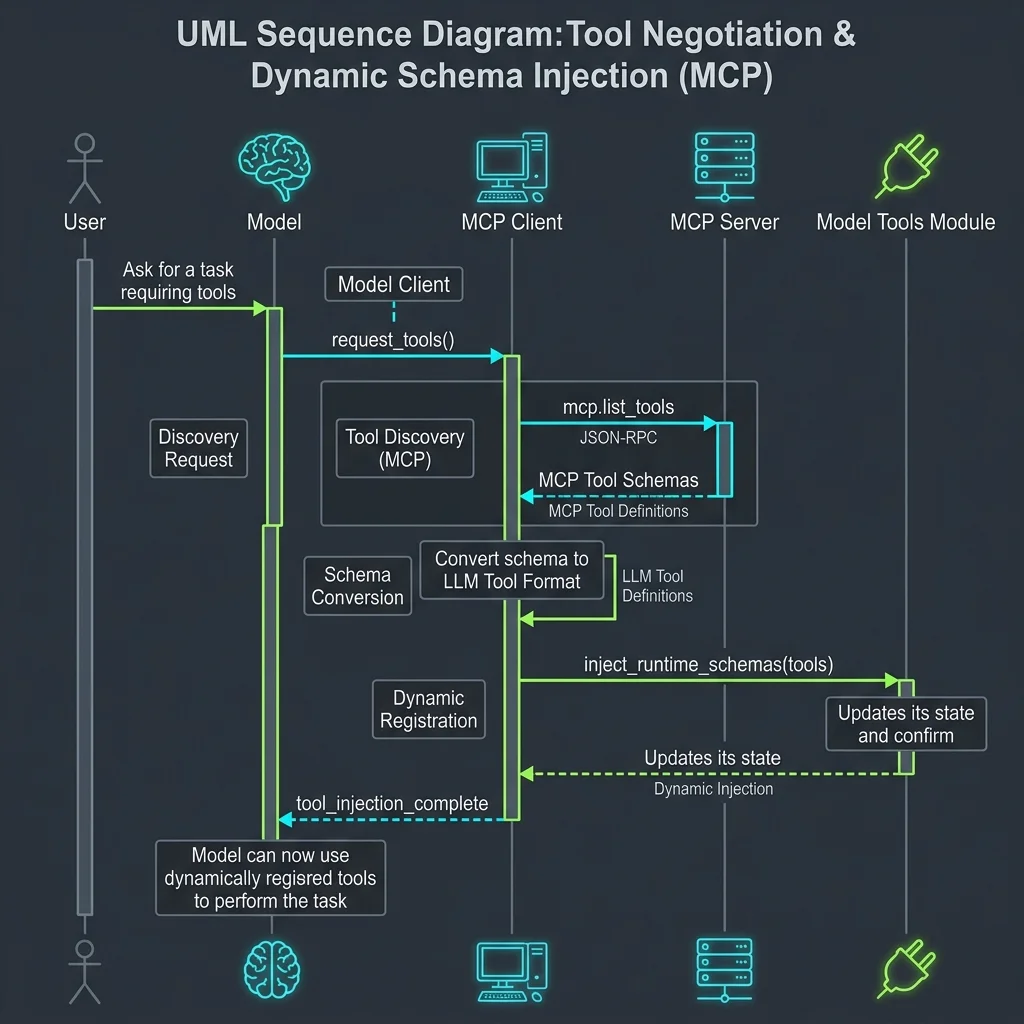
📊 Fig 10-2: UML sequence diagram: JSON-RPC-based tool discovery, dynamic Schema validation & injection flow
⚙️ 2. acp_adapter/ Host IDE (VSCode/Zed) Bridge Internals
In the acp_adapter/ directory, the system acts as an LSP (Language Server Protocol) and TCP/Unix Socket bridge, allowing editors like VSCode, Zed, and JetBrains to mount Hermes as a backend execution plugin:
- JSON-RPC Listener: The service starts a persistent connection server. The host editor, acting as a client, encodes requests such as "execute command," "get file context," and "auto-refactor" as standard JSON-RPC 2.0 packets.
- Workspace Mount: The adapter dynamically maps the host editor's local directory into the agent's Workspace using FUSE or OverlayFS.
- State Sync Return: The adapter streams the agent's intermediate thoughts and tool results back to the host, displayed in the sidebar or output terminal.
🛠️ 3. tools/registry.py Tool Discovery & Auto-Reflection
All tools are registered in their Python source files simply by using the @register decorator. This mechanism is controlled by tools/registry.py. At runtime, the system uses Python introspection to reflect and generate LLM-format tool definitions:
# tools/registry.py core logic for auto-generating JSON Schema
import inspect
from typing import get_type_hints

def register_tool(name: str):
    def decorator(func):
        # Use inspect module to extract function signature and Docstring
        sig = inspect.signature(func)
        doc = inspect.getdoc(func) or ""
        type_hints = get_type_hints(func)

        # Assemble LLM-standard Tool Schema
        schema = {
            "type": "function",
            "function": {
                "name": name,
                "description": doc.split("\n")[0],
                "parameters": {
                    "type": "OBJECT",
                    "properties": {}
                }
            }
        }
        # Auto-extract parameter types and required flags
        # ...
        func.schema = schema
        return func
    return decorator
💡 Beginner Tip
Whenever you create a new tool, simply add the @register decorator to the function. The system automatically introspects and translates it into an LLM Schema when discover_builtin_tools() is triggered in model_tools.py — no need to hand-write verbose JSON.
🔗 Sub-Chapter Deep Dives
For a deeper understanding of MCP protocol integration, we recommend the following technical sub-topics: